Cloud cost management is the practice of understanding, controlling, and optimizing cloud spend so organizations can use cloud resources efficiently without slowing innovation. In Azure environments, this means tracking costs across subscriptions, resource groups, services, applications, and teams, then using that insight to make better decisions about budgets, ownership, resource usage, and optimization.
For many organizations, Azure cloud cost management starts with native Microsoft tools such as Azure Cost Management + Billing, Azure Advisor, Azure Monitor, budgets, alerts, and cost analysis. These tools help teams understand where spend is happening and where optimization opportunities may exist.
But visibility is only the starting point.
A dashboard can show that Azure spend increased. A recommendation can suggest that a resource may be underused. A budget alert can warn that costs are trending higher than expected. What those tools cannot do on their own is decide which workloads should be resized, which resources can be retired, which teams need better tagging, or which architectural changes will reduce waste without creating performance risk.
That is where cloud cost management becomes an operating discipline, not just a reporting exercise.
For Azure-focused organizations, the goal is not simply to lower the bill. The goal is to make cloud spending predictable, accountable, and connected to business value.
What Is Cloud Cost Management?
A useful Azure cost management process should answer five practical questions:
- What are we spending?
- Who owns that spend?
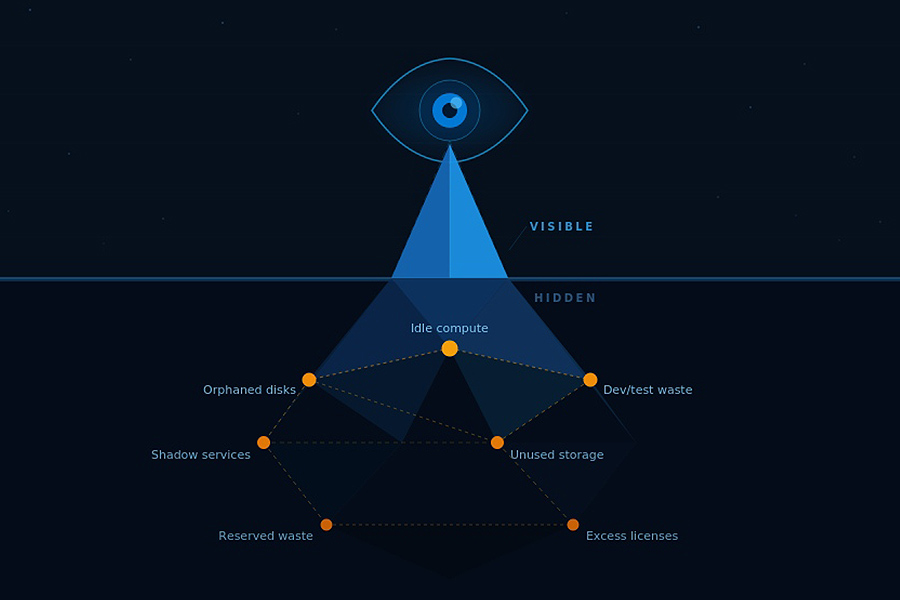
- Which resources are underused, oversized, idle, or unnecessary?
- Which changes can reduce cost without hurting performance, security, or reliability?
- How do we keep the same waste from returning next month?
These questions matter because Azure costs are rarely simple. A virtual machine may look expensive in a cost report, but the right decision depends on how that resource supports the business. Is it production or non-production? Is it idle, or does it support a critical workload during peak periods? Is it oversized, or intentionally configured for reliability? Should it be resized, reserved, shut down on a schedule, moved to a platform service, or redesigned?
Good cost management does not chase the cheapest possible configuration. It helps teams spend with intention.
Most Azure cost management programs include four connected activities:
Cost Visibility
Understanding spend by subscription, resource group, workload, service, owner, tag, and time period.
Cost Allocation
Mapping Azure expenses to teams, applications, departments, customers, or business units.
Cost Optimization
Reducing waste through rightsizing, scheduling, storage cleanup, reservation planning, savings plans, and architecture improvements.
Cost Governance
Creating policies, alerts, tagging standards, budgets, ownership rules, and review processes that keep costs manageable as Azure environments grow.
This is also where cloud cost management overlaps with FinOps. FinOps brings finance, engineering, IT, and business stakeholders into the same operating model so cloud spending decisions are tied to performance, accountability, and business value.
Why Azure Cloud Costs Become Difficult to Control
Azure costs rarely become difficult to manage all at once. They drift.
A test environment stays online longer than planned. Storage grows without lifecycle rules. A database is sized for peak demand but runs below capacity most of the month. A development workload keeps running after hours. A migration moves workloads into Azure, but the architecture still behaves like it did on-premises.
Individually, these issues may look small. Together, they create a cloud bill that becomes harder to explain, forecast, and reduce.
Cloud Growth Moves Faster Than Governance
Azure gives teams the speed to provision resources quickly. That flexibility helps organizations modernize applications, support new business needs, and launch faster.
But speed creates risk when governance does not keep up.
Costs become harder to manage when resources are created without clear ownership, tagging standards, budget thresholds, or review processes. The organization may know total Azure spend, but not why it changed, who owns it, or which resources can be optimized safely.
Common warning signs include:
- subscriptions or resource groups without clear owners
- unused development and test environments
- inconsistent or missing tags
- storage growth without lifecycle policies
- oversized virtual machines
- unclear responsibility between IT, finance, and application teams
When governance is weak, cost management becomes reactive. Teams spend more time explaining spend after it happens than controlling it earlier.
Azure Spend Has Many Owners
Cloud costs are influenced by many teams.
Infrastructure teams manage the environment. Application teams influence architecture and usage. DevOps teams automate deployment. Security teams define monitoring, retention, and compliance requirements. Finance teams need predictability. Business leaders want cloud investments to support growth.
That shared ownership creates confusion when there is no clear process.
A virtual machine may look expensive in a cost report, but the report alone does not explain whether it should be resized, reserved, shut down, or left alone. The right decision depends on workload criticality, performance needs, environment type, usage patterns, and approval ownership.
Without that context, cost management becomes a monthly debate instead of a normal operating process.
Reactive Reviews Happen Too Late
Many organizations still review Azure costs after the bill arrives.
They investigate spikes at the end of the month, ask teams to explain changes, and look for cleanup opportunities after resources have already been running for weeks. By then, small inefficiencies may have become recurring spend.
This is cost cleanup, not cost control.
Manual Tracking Does Not Scale
Spreadsheets can help teams start organizing cloud costs, but they are not enough for active Azure environments.
Azure usage changes constantly. New resources appear, workloads scale, storage grows, and usage patterns shift. Manual tracking depends on people noticing the right issue, collecting the right data, and following up at the right time. That creates gaps.
Migration Does Not Guarantee Savings
Moving workloads to Azure does not automatically reduce costs.
If workloads are lifted and shifted without modernization, rightsizing, or governance, the organization may recreate old inefficiencies in a new environment. Common post-migration issues include oversized virtual machines, always-on non-production environments, inefficient storage choices, long log retention, and limited cost allocation.
The real issue is cost drift. Azure cost control improves when teams can see changes early and assign ownership before small inefficiencies become recurring spend.
Native Azure Tools for Cloud Cost Management
Azure provides native tools that help organizations monitor, analyze, and optimize cloud spend. These tools are usually the best starting point for Azure-focused teams because they are connected to Microsoft billing, subscriptions, resource groups, usage data, and recommendations.
For most organizations, native Azure tools provide the foundation for cost visibility, budgeting, forecasting, and planning.
Azure Cost Management + Billing
Azure Cost Management + Billing is the core Microsoft tool for understanding cloud costs. Microsoft describes Cost Management as a suite of FinOps tools that helps organizations analyze, monitor, and optimize Microsoft Cloud costs across billing accounts, subscriptions, resource groups, and management groups.
It helps teams review:
- current Azure spend
- historical cost trends
- costs by subscription, resource group, or service
- budget performance
- unexpected charges
- forecasted spend
- cost allocation data
This is where many Azure cost conversations begin because it gives finance, IT, and engineering teams a shared view of cloud spend.
Azure Budgets and Cost Alerts
Azure budgets and cost alerts help teams monitor spend against defined thresholds. Microsoft’s Cost Management documentation includes budget alerts, credit alerts, department spending quota alerts, and cost anomaly alerts.
These alerts are most useful when they are tied to clear ownership. Teams should define who receives the alert, who investigates it, what threshold requires action, and how quickly the team should respond.
Azure Advisor
Azure Advisor analyzes Azure resource configuration and usage telemetry, then provides recommendations to improve cost effectiveness, performance, reliability, and security.
From a cost perspective, Advisor can help identify idle and underused resources. Microsoft notes that Advisor cost recommendations can help reduce Azure spend by identifying idle and underutilized resources.
Azure Pricing Calculator and Cost Estimation
Cost management should start before deployment. Azure pricing and estimation resources, including the Azure Pricing Calculator, TCO Calculator, and Azure Migrate, help teams estimate costs before launching new workloads, expanding environments, or planning migrations.
Azure Reservations and Savings Plans
For predictable workloads, Azure reservations and savings plans can help reduce rates. Microsoft Cost Management includes optimization guidance for acting on recommendations, saving with savings plans, saving with reservations, and managing Azure Hybrid Benefit.
These options work best after teams understand stable usage patterns. Committing too early can create its own kind of cloud-budget awkwardness.
Azure Well-Architected Framework: Cost Optimization
The Azure Well-Architected Framework helps teams design workloads that achieve business value over time. Its cost optimization guidance emphasizes cost-management discipline, cost-efficient design, usage optimization, rate optimization, and ongoing monitoring.
Where Native Visibility Stops and Managed Optimization Begins
Azure-native tools are valuable because they show where spend is happening, where usage is changing, and where potential savings may exist.
But cost visibility is not the same as cost optimization.
A report can show that Azure spend increased. A budget alert can warn that costs are trending higher than expected. Azure Advisor can surface recommendations for underused or idle resources. These signals are useful, but they still leave teams with the harder question: what should we do next?
Optimization Requires Context
Before acting on a cost recommendation, teams need to understand the workload behind it.
For example, a virtual machine may look underused. But before resizing or shutting it down, the team needs to know:
- whether it supports production, development, or testing
- who owns the workload
- whether low usage is temporary or normal
- whether the resource supports a critical process
- whether resizing could affect performance
- whether the architecture itself needs to change
This context matters. Cutting cost without understanding workload behavior can create downtime, performance issues, or operational risk. Good Azure cost optimization is not about spending less at any cost. It is about spending better.
Recommendations Need Prioritization
Most Azure environments have more optimization opportunities than teams can act on at once.
Some are quick wins. Some require testing. Some need application-owner approval. Some may look attractive financially but carry operational risk. Without prioritization, recommendations become another backlog – and nobody needs a cloud-cost to-do list that looks like it has been eating protein powder.
Teams should prioritize recommendations based on:
- estimated savings
- implementation effort
- workload criticality
- performance impact
- security or compliance requirements
- dependency risks
- long-term value
Optimization Requires Coordination
Cost decisions rarely belong to one team.
Finance wants predictability. Engineering wants performance and delivery speed. IT wants stability. Security wants compliance. Business leaders want cloud investments to support growth.
A recommendation may be technically valid, but someone still needs to confirm ownership, communicate the change, get approval, implement it safely, and measure the result.
Managed Optimization Turns Insight Into Action
Managed optimization helps organizations move from “we can see the opportunity” to “we have a process for acting on it.”
That process usually includes reviewing Azure cost data, validating recommendations, prioritizing savings opportunities, coordinating with workload owners, implementing approved changes, and tracking outcomes.
This is the point where Azure cost management moves beyond reporting. Native tools provide the signal. Managed optimization helps turn that signal into measurable, repeatable action.
How VIAcode Helps with Azure Cloud Cost Management
Azure cost management works best when cost visibility, workload context, and execution are connected. Many organizations already have access to Azure cost data, but still struggle to turn that data into a practical operating model.
VIAcode helps Azure-focused teams close that gap through vBox, Azure Assist, and hands-on Azure expertise. The goal is not to add another dashboard for the sake of it. The goal is to help teams identify cost issues earlier, prioritize the right actions, and manage Azure optimization as an ongoing process.
Continuous Azure Cost Visibility
VIAcode helps teams monitor Azure cost behavior over time so unusual patterns are easier to catch before they become recurring spend.
This can help answer questions such as:
- Which Azure resources are driving cost increases?
- Which workloads are changing faster than expected?
- Which environments are underused or oversized?
- Where are costs growing without clear ownership?
- Which resources need review before the next billing cycle?
This gives IT, finance, and engineering teams a clearer view of where spend needs attention.
Resource-Level Insights
High-level cost reporting is useful, but many optimization decisions happen at the resource level.
VIAcode helps teams look closer at the Azure resources behind the spend, including virtual machines, storage, development environments, and other services that may be oversized, idle, or missing ownership.
This level of detail helps teams move from “the bill increased” to “this resource, workload, or environment needs action.” Much better than playing cloud-cost detective with three spreadsheets and a strong coffee.
Prioritized Optimization Recommendations
Not every cost-saving opportunity should be treated the same way. Some changes are quick wins. Others need testing, approval, or workload review.
VIAcode helps prioritize Azure optimization opportunities based on savings potential, implementation effort, workload impact, operational risk, and business value. This helps teams focus on actions that are both realistic and safe.
Azure Assist for Managed Optimization
Azure Assist gives organizations a managed-service layer for Azure operations and cost optimization.
It can support proactive cost monitoring, ongoing usage review, optimization recommendations, implementation support, monthly reporting, strategic guidance, and governance improvements.
This is especially helpful for teams that know savings opportunities exist but do not have the internal capacity to manage optimization continuously.
vBox for Cost, Security, Performance, and Operations
vBox helps teams view Azure cost in a broader operational context. That matters because cost decisions can affect performance, reliability, security, and business continuity.
Before resizing a workload, teams may need to understand whether it supports a critical application, whether performance is already constrained, or whether compliance requirements apply. vBox helps bring those signals together so cost optimization decisions are better informed.
Better Governance for Long-Term Control
VIAcode also helps strengthen the practices that keep Azure spend manageable over time, including tagging standards, ownership models, reporting cadences, budget awareness, and review processes.
For growing Azure environments, this is the real value: not just finding waste once, but building a more disciplined way to manage cloud spend every month.
Real-World Azure Cost Optimization Examples
Azure cloud cost management becomes more credible when it is tied to measurable outcomes. The following examples show how structured Azure cost optimization can reduce waste, improve visibility, and create a more disciplined approach to cloud spend.
Example 1: Reducing Monthly Azure Costs by 24%
A national field services and energy infrastructure provider needed better control over Azure costs across a distributed, multi-subscription environment.
VIAcode deployed vBox to improve cost visibility, identify optimization opportunities, and create a roadmap for continued governance. The engagement reduced monthly Azure costs by 24% within the first month, while giving the organization a clearer process for managing spend as the environment scaled.
Example 2: Creating More Than $300K in Annualized Savings
A national commercial landscaping services provider needed to reduce Azure waste across a growing Azure footprint with 18 subscriptions.
VIAcode used vBox in an 8-week optimization engagement focused on identifying inefficiencies, rightsizing resources, and building a repeatable cost optimization process. The result was more than $300K in annualized savings and ROI in under two weeks.
Additional Proof Point
VIAcode also helped a global specialty materials manufacturer control rising Azure costs across fragmented environments, delivering more than $223K in realized savings and identifying $586K+ in total potential savings.
These examples show the practical value of moving beyond cost reporting. When Azure spend is connected to resource-level insight, expert review, and implementation support, cost optimization becomes measurable – not just theoretical.
Azure Cloud Cost Management Checklist
Use this checklist to turn Azure cost management from a monthly review into a repeatable operating process.
1. Improve Cost Visibility
- Review Azure spend by subscription, resource group, service, and workload
- Track month-over-month cost changes
- Separate production, development, test, and shared environments
2. Strengthen Ownership and Tagging
- Define required tags for owner, application, environment, and cost center
- Identify untagged or inconsistently tagged resources
- Assign owners to shared services and major workloads
3. Identify Waste
- Review underused virtual machines
- Remove unattached disks, unused public IPs, and old snapshots
- Check non-production environments that run outside business hours
4. Build a Review Cadence
- Review Azure costs monthly
- Investigate anomalies quickly
- Prioritize recommendations by savings, effort, and risk
- Track completed actions and realized savings
5. Add Governance
- Set budget thresholds and alerts
- Define who responds to cost alerts
- Create approval rules for high-cost resources
- Document optimization decisions
If recommendations are visible but not being acted on, managed optimization may be the next step.
FAQ: Azure Cloud Cost Management
What is cloud cost management?
Cloud cost management is the process of tracking, analyzing, optimizing, and governing cloud spend so organizations can reduce waste and improve accountability.
Is Azure Cost Management enough?
Azure Cost Management is a strong starting point for visibility, budgets, and trends. Larger or fast-growing environments often need additional process, ownership, and implementation support.
What causes Azure costs to increase unexpectedly?
Common causes include oversized resources, idle workloads, storage growth, missing tags, misconfigured scaling, long log retention, and development environments running after hours.
What is rightsizing in Azure?
Rightsizing means matching Azure resources to actual workload demand so teams reduce unnecessary spend without hurting performance or reliability.
How often should Azure costs be reviewed?
Azure costs should be reviewed monthly, with more frequent monitoring for anomalies, high-cost resources, and active optimization work.
Take Control of Azure Cloud Costs with Continuous Optimization
Azure cloud cost management should not feel like a recurring fire drill. With the right visibility, ownership, and optimization process, teams can reduce waste, improve forecasting, and make cloud spend easier to explain.
VIAcode helps Azure-focused organizations turn cost insights into measurable action through vBox and Azure Assist – Cost Management.
Ready to Optimize Azure Spend?
Start with VIAcode’s Azure Cost Optimization Assessment to uncover savings opportunities, prioritize next steps, and build a practical roadmap for continuous Azure cost optimization.