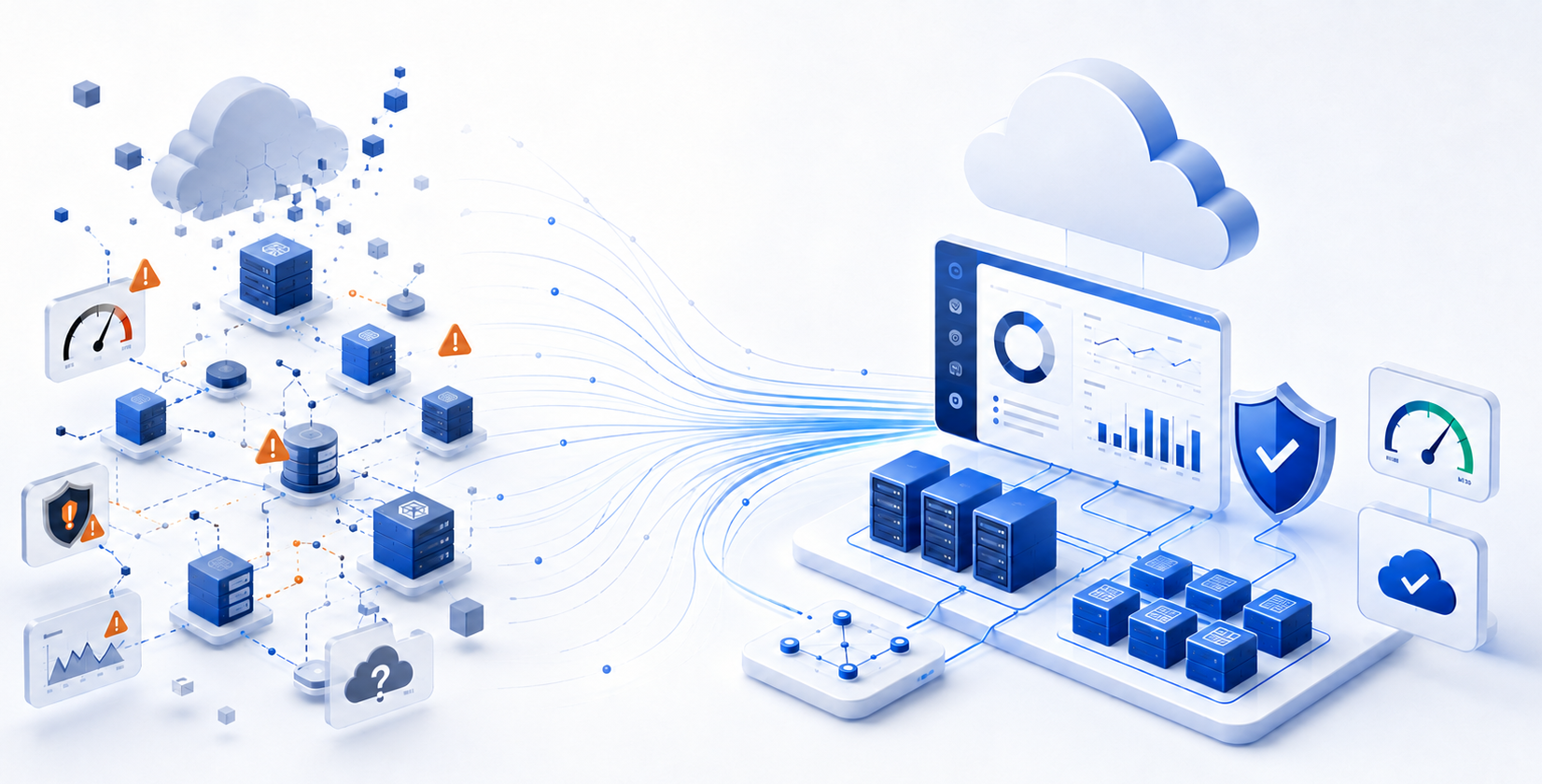
Cloud infrastructure rarely becomes difficult to manage overnight.
Complexity usually grows one resource, subscription, application, alert, permission, and configuration at a time. A company may begin with a small Azure environment managed by a few experienced people. As the environment expands, teams add workloads, automation, security controls, monitoring systems, recovery processes, and cost-management practices.
Eventually, the organization may have plenty of cloud data but no consistent way to turn that information into action.
This can lead to:
- Delayed incident response
- Rising or unpredictable cloud costs
- Unresolved security recommendations
- Inconsistent configurations
- Unclear resource ownership
- Untested recovery plans
- Too many alerts and too little useful context
- Operational decisions being made reactively
This is why choosing a cloud infrastructure management solution is not simply a software comparison.
Organizations need a practical operating model for understanding what is happening in the cloud, responding to problems, controlling costs, enforcing standards, protecting access, automating routine work, maintaining resilience, and assigning clear responsibility for improvement.
The best solution is usually not one product. It is a combination of Azure-native services, infrastructure automation, monitoring, FinOps practices, security controls, recovery planning, operational processes, and specialist expertise.
What Are the Best Cloud Infrastructure Management Solutions?
For organizations using Microsoft Azure, the strongest cloud infrastructure management approach usually combines several solution categories:
- Monitoring and observability
- Azure-native management services
- Infrastructure as code and deployment automation
- Cost management and FinOps
- Managed cloud infrastructure services
- Backup and disaster recovery
- Security and access governance
Microsoft provides the technical foundation through services such as Azure Resource Manager, Azure Bicep, Azure Monitor, Azure Advisor, Azure Policy, Microsoft Cost Management, Microsoft Defender for Cloud, Microsoft Sentinel, Azure Backup, and Azure Site Recovery.
Azure Monitor brings together metrics, logs, traces, and events to help organizations understand application and infrastructure health. Azure Advisor analyzes configuration and usage information and provides recommendations across cost, performance, reliability, security, and operational excellence. Microsoft Cost Management provides FinOps capabilities for analyzing, allocating, monitoring, and optimizing Microsoft Cloud costs.
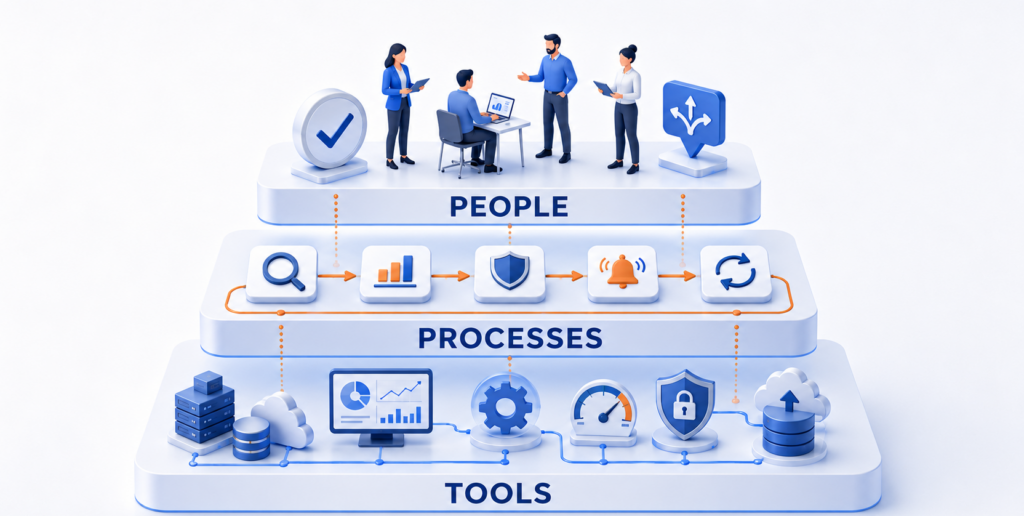
These services provide extensive technical capabilities, but tools alone do not create a complete management model.
Organizations still need people and processes to:
- Assign work to the correct team
- Decide what should be addressed first
- Evaluate operational risk
- Review recommendations
- Implement changes
- Respond to incidents
- Test recovery
- Tune monitoring
- Maintain improvements as the environment changes
- Measure results
When internal teams cannot consistently provide these capabilities, an Azure-specialized services provider can supplement the Microsoft platform with monitoring, incident processes, implementation support, security management, cost optimization, and ongoing governance.
Relevant VIAcode services include:
- Azure Monitoring and Management
- Azure Cost Optimization Assessment
- Azure Cost Optimization Implementation
- Azure Security Assessment
- Security Improvement Implementation
- Azure Backup and Disaster Recovery
- Azure Assist managed services
Cloud Infrastructure Management Solutions at a Glance
| Solution type | Best for | Main capabilities | Common limitation |
|---|---|---|---|
| Azure-native management services | Organizations with experienced Azure teams | Resource management, monitoring, recommendations, policies, cost analysis, security, backup, and recovery | Findings still require ownership, prioritization, and implementation |
| Infrastructure as code | Repeatable deployments and configuration control | Reusable templates, deployment consistency, modules, policy integration, and automated provisioning | Does not replace monitoring, incident response, or continuous optimization |
| Monitoring and observability | Performance, availability, and application management | Metrics, logs, traces, events, alerts, dashboards, and diagnostics | Poor configuration can create excessive alert noise |
| FinOps and cost optimization | Organizations with growing or unpredictable Azure costs | Allocation, budgets, forecasting, anomaly alerts, rightsizing, commitments, and waste identification | Savings remain theoretical until recommendations are implemented |
| Security and governance | Regulated, complex, or high-risk environments | Policy enforcement, posture management, access governance, threat detection, and compliance monitoring | Recommendations require remediation owners and change controls |
| Backup and disaster recovery | Business-critical applications and data | Backup, replication, failover, recovery planning, testing, and documentation | Technology alone does not validate business recovery |
| Managed Azure services | Organizations with limited time, coverage, or specialist expertise | Monitoring, triage, optimization, security, resilience, governance, and advisory support | Quality depends on Azure expertise, transparency, processes, and accountability |
The right choice depends on what the organization can operate effectively with its internal resources and where additional support is required.
What Is Cloud Infrastructure Management?
Cloud infrastructure management is the ongoing process of keeping cloud resources available, secure, cost-efficient, governed, recoverable, and aligned with business requirements.
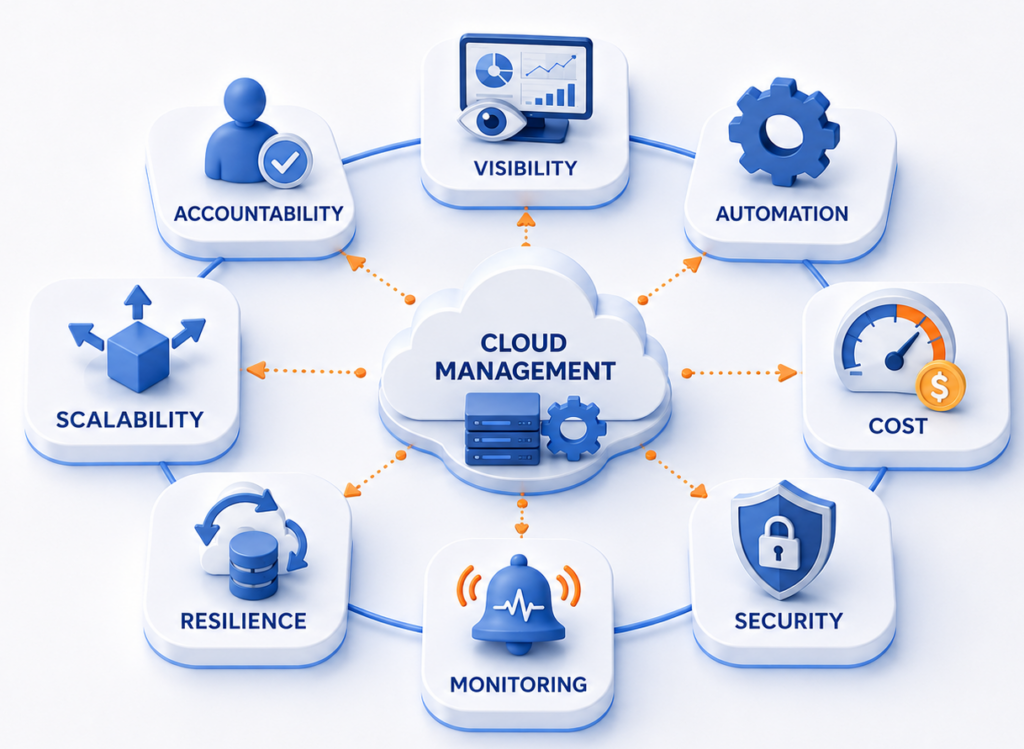
It covers more than deploying infrastructure or reviewing the monthly Azure bill. A complete cloud infrastructure management model normally includes:
- Infrastructure automation
- Resource provisioning and configuration
- Monitoring and observability
- Performance and capacity management
- Policy and governance
- Cost management and FinOps
- Backup and disaster recovery
- Identity and access governance
- Security posture management
- Incident management
- Continuous optimization
- Compliance reporting
These areas are closely connected.
An oversized virtual machine can increase costs every month. The same virtual machine may also have incomplete monitoring, excessive permissions, outdated backup policies, or no clearly assigned owner.
A poorly configured alert can fail to detect an important issue. It can also generate so many routine notifications that teams begin ignoring the monitoring system.
A disaster recovery plan may look complete on paper while missing application dependencies, realistic recovery objectives, current contact information, or validated failover procedures.
Cloud infrastructure management breaks down when cost, security, monitoring, recovery, and governance are treated as separate dashboards with separate owners and no shared operating process.
The objective is not to collect more information. It is to create a repeatable system that turns cloud information into decisions, assignments, actions, and measurable results.
How to Evaluate Cloud Infrastructure Management Solutions
Calling a solution the “best” is only useful when the evaluation criteria are clear.
Organizations should compare cloud infrastructure management options across the following areas.
1. Visibility
A management solution should provide useful information across subscriptions, resource groups, applications, workloads, and business teams.
It should help answer questions such as:
- Which subscriptions are generating unexpected costs?
- Which resources are unhealthy?
- Which security findings create the greatest risk?
- Which recommendations have not been implemented?
- Which incidents are still unresolved?
- Which backup jobs failed?
- Which applications are approaching capacity limits?
- Which resources have no clear owner?
Azure Monitor provides a shared observability platform for collecting, analyzing, and acting on metrics, logs, traces, and events from cloud and hybrid environments.
However, greater visibility does not automatically produce greater clarity.
Information needs to be organized around business services, resource ownership, operational priority, and the action expected from the receiving team.
2. Automation
Automation helps teams deploy resources consistently and reduce repetitive work.
Azure Bicep is a declarative infrastructure-as-code language for repeatedly deploying Azure resources. It supports reusable modules, consistent deployments, integration with Azure services, and change previews before deployment.
Infrastructure automation can help organizations:
- Standardize naming and tagging
- Integrate infrastructure with development pipelines
- Apply policy as code
- Reduce configuration differences
- Review changes before deployment
- Create repeatable environments
- Reuse approved modules
- Recreate environments more efficiently
Automation should not be confused with complete cloud management.
A deployment can be technically consistent and still create an expensive, poorly monitored, insecure, or unreliable workload. Automation makes deployment repeatable, but it does not determine whether the underlying architecture is appropriate.
3. Cost Management and FinOps
A suitable solution should help organizations understand where money is being spent, who is responsible for that spending, and which actions can improve efficiency.
Microsoft Cost Management provides tools to analyze costs, monitor budgets and anomalies, allocate shared costs, apply tag inheritance, export data, and identify optimization opportunities.
Organizations should evaluate whether their approach supports:
- Cost allocation
- Business ownership
- Budget alerts
- Forecasting
- Rightsizing
- Anomaly detection
- Idle-resource identification
- Verification of realized savings
- Implementation tracking
- Reservation and savings-plan analysis
- Resource tagging
Cost visibility explains where money is being spent. Cost optimization requires someone to evaluate, approve, implement, test, and measure a change.
A virtual machine may appear oversized because average utilization is low. Before resizing it, the organization may need to evaluate demand peaks, application dependencies, recovery requirements, performance commitments, and future growth.
A strong process connects cost data with engineering context.
- Azure Cost Optimization Implementation
- Azure Assist – Cost Management
- Cost Management and Optimization solutions
4. Security and Governance
A cloud management solution should help enforce standards, detect configuration problems, manage access, and assign responsibility for remediation.
Azure Policy helps organizations enforce standards and assess compliance at scale. It can also support remediation of noncompliant resources.
Microsoft Defender for Cloud provides security posture management, recommendations, workload protection, and identity-related risk analysis.
Organizations should evaluate whether they can:
- Identify configuration drift
- Detect excessive permissions
- Assign remediation owners
- Review privileged access
- Support internal and regulatory requirements
- Track completed improvements
- Prevent noncompliant resources from being deployed
- Prioritize security findings
- Apply policies consistently across subscriptions
A security dashboard may identify a problem, but the organization still needs a process for determining who will resolve it and how urgently it must be addressed.
5. Monitoring and Incident Response
Monitoring should help teams detect, understand, assign, and resolve problems.
A strong monitoring and incident model should include:
- Capacity monitoring
- Performance monitoring
- Alert correlation
- Log analysis
- Triage
- Escalation
- Availability testing
- Collaboration workflows
- Alert-threshold tuning
- Incident ownership
- Regular incident reviews
- Application health
- Resource health
The quality of a monitoring system should not be measured by how many alerts it generates.
A more useful question is whether the right person receives understandable information early enough to reduce business impact.
VIAcode’s Azure Monitoring and Management service includes open-ticket reviews, custom incident workflows, triage and escalation, Azure service integrations, Azure DevOps and Microsoft Teams connectors, capacity and availability monitoring, weekly noise reduction, and alert-threshold tuning.
These capabilities are examples of the operational work required after monitoring tools have been installed.
6. Backup, Recovery, and Resilience
Backup and disaster recovery should be evaluated as operational disciplines, not only as product features.
Azure Site Recovery supports replication, failover, and failback for supported Azure and on-premises workloads. Azure Backup is used to keep data protected and recoverable.
A complete resilience model should address:
- Critical application identification
- Infrastructure and application dependencies
- Recovery Point Objectives
- Backup policies
- Communication responsibilities
- Failover sequences
- Recovery testing
- Replication health
- Training
- Ongoing compliance monitoring
- Documentation
- Recovery Time Objectives
VIAcode’s Backup and Disaster Recovery service includes infrastructure assessment, RTO and RPO definition, DR architecture, Azure Site Recovery configuration, backup and replication setup, failover testing, documentation, and knowledge transfer.
A recovery plan is not complete merely because replication is enabled. It must be tested against the way applications and teams actually operate.
7. Scalability and Integration
The solution should continue working as the Azure environment grows.
A process that works for two subscriptions may not work when the organization has:
- Dozens of subscriptions
- Multiple business units
- Separate application teams
- Several ticketing and collaboration platforms
- Different regulatory requirements
- Shared infrastructure services
- External development partners
Cloud management should integrate with development, security, finance, service management, communication, and reporting processes.
It should also preserve enough standardization to give leadership a consistent view without forcing every team to use the same interface for every task.
8. Operational Expertise and Accountability
Even an advanced platform cannot compensate for missing ownership.
Organizations should be able to answer:
- Who reviews cost recommendations?
- Who responds to alerts outside normal hours?
- Who decides whether a resource change is safe?
- Who evaluates security findings?
- Who tests recovery?
- Who tunes monitoring thresholds?
- Who reports progress to business stakeholders?
- Who confirms that an optimization delivered the expected outcome?
- Who verifies that backups succeeded?
Responsibility may be shared between internal platform teams, security teams, finance, application owners, a cloud center of excellence, and an external services provider.
The important point is that every meaningful signal has an owner and an expected next step.
Best Types of Cloud Infrastructure Management Solutions
Organizations should evaluate how the main solution categories work together rather than searching for one product that claims to manage everything.
1. Azure-Native Infrastructure Management
Microsoft’s Azure management services provide the foundation for controlling infrastructure, costs, policies, security, availability, and recovery.
Core services include:
- Azure Resource Manager
- Azure Monitor
- Azure Advisor
- Azure Bicep
- Microsoft Defender for Cloud
- Microsoft Cost Management
- Azure Site Recovery
- Microsoft Sentinel
- Azure Backup
- Azure Policy
Azure-native tools may be sufficient when the organization has:
- A controlled Azure environment
- Experienced platform and operations teams
- Time to review recommendations
- Consistent governance
- Clear responsibility for implementation
- Recovery processes that are regularly tested
- Defined resource ownership
- Established incident procedures
The challenge is rarely the absence of technical features.
An Azure Advisor recommendation does not implement itself. A Defender for Cloud finding does not automatically become an approved remediation task. An Azure Monitor alert does not guarantee that the correct team understands the business impact.
Native tools provide the foundation and the signals. The organization still needs an operating model.
2. Infrastructure as Code and Automation
Infrastructure as code is especially useful when an organization has multiple environments, frequent deployments, or strict configuration requirements.
It can improve:
- Deployment repeatability
- Configuration consistency
- Change control
- Developer productivity
- Environment standardization
- Policy enforcement
- Recovery speed
- Auditability
However, infrastructure as code should be connected to monitoring, cost management, security, and governance.
Automating a poor configuration simply allows the same problem to be deployed consistently.
A better model uses automation to apply approved architectural and governance decisions repeatedly.
3. Monitoring and Observability
Observability solutions help organizations understand the condition and behavior of applications and infrastructure.
A complete model may collect:
- Application logs
- Distributed traces
- Azure resource health
- Network information
- Availability tests
- Backup status
- Capacity utilization
- Infrastructure metrics
- Alerts and automated actions
- Security events
- Cost anomalies
The main operational challenge begins after the data is collected.
Monitoring needs continual maintenance:
- Signals must be reviewed
- Thresholds must be adjusted
- New workloads must be added
- Escalation paths must remain current
- Owners must be assigned
- Unresolved incidents must be reviewed
- Duplicate notifications must be removed
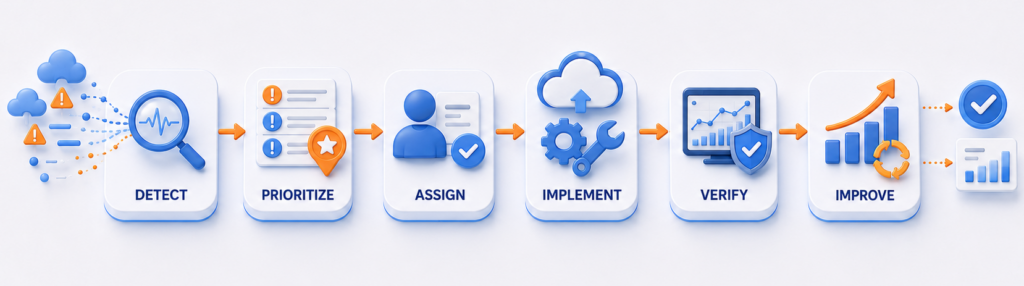
Managed monitoring can be valuable when internal teams lack dedicated Azure operations or site reliability engineering coverage.
4. FinOps and Continuous Cost Optimization
FinOps connects cloud spending with business accountability and engineering decisions.
An effective cost-optimization cycle normally includes:
1
Validate impact
Validate the technical and business impact.
2
Identify
Identify an opportunity.
3
Approve
Approve the change.
4
Implement
Implement it.
5
Measure
Measure actual savings.
6
Monitor
Continue monitoring.
7
Test
Test performance and functionality.
8
Assign
Assign an owner.
VIAcode’s Cost Optimization Assessment evaluates resource utilization, billing models, rightsizing opportunities, historical spending, and future cost trends.
Its Cost Optimization Implementation service adds hands-on resource reconfiguration, billing-model adjustments, execution, and quality-assurance testing.
Azure Assist – Cost Management adds budget alerts, abnormal cost-deviation alerts, continual optimization monitoring, forecasting, policy configuration, and monthly reviews.
This progression is important
- An assessment identifies opportunities.
- Implementation converts recommendations into changes.
- Ongoing management helps prevent waste from returning.
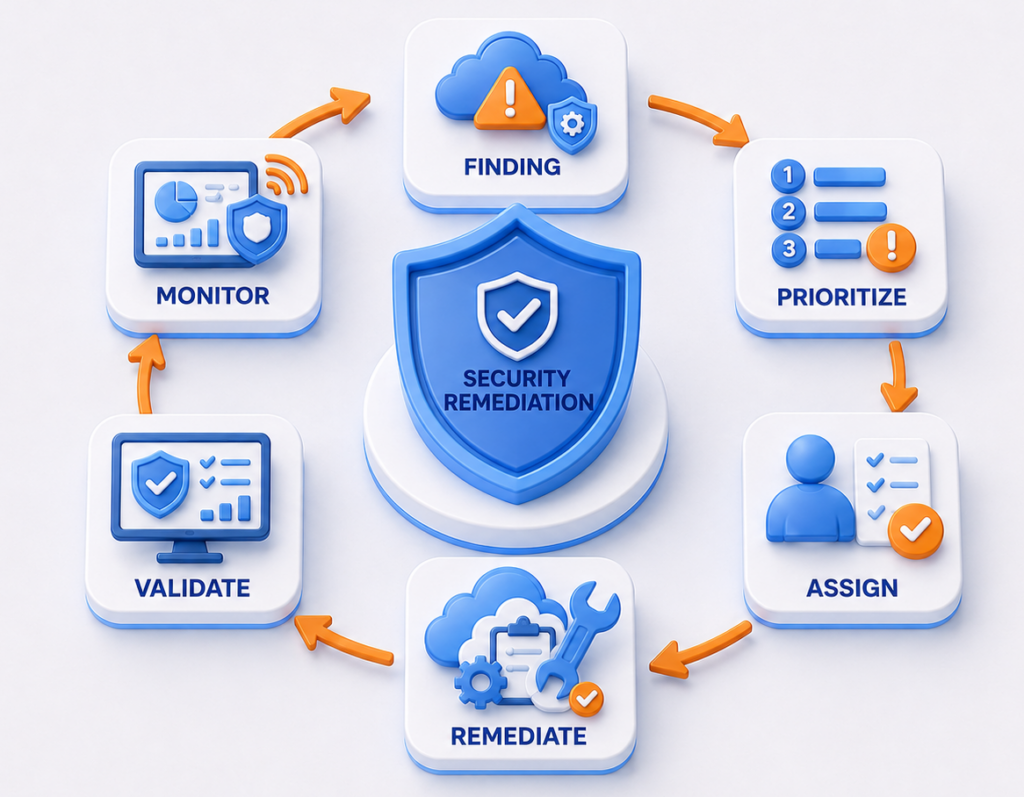
5. Security, Entitlement, and Governance Management
Security management should combine technical controls with practical remediation processes.
The management model should cover:
- Infrastructure configurations
- Identity and permissions
- Network exposure
- Threat detection
- Remediation
- Continuous reassessment
- Policy compliance
- Vulnerability prioritization
VIAcode’s Azure Security Assessment reviews Azure and Microsoft 365 infrastructure, identifies security gaps, categorizes findings by severity, and provides actionable recommendations.
VIAcode also offers a separate implementation service for turning assessment findings into security improvements.
Azure Assist – Security Management provides ongoing policy enforcement, monitoring, monthly reviews, compliance visibility, and configuration adjustments.
This distinction matters because assessment, implementation, and continuous management solve different problems.
6. Managed Azure Infrastructure Services
Managed services combine tools with operational expertise and repeatable processes.
They are particularly relevant when:
- Internal teams cannot provide required coverage
- Alerts are not consistently triaged
- Azure costs are increasing without clear ownership
- Recommendations remain unresolved
- Backup compliance is inconsistent
- Recovery testing is irregular
- Security controls vary across subscriptions
- Teams spend more time reacting than improving
- The organization lacks specialist Azure expertise
Azure Assist is presented as a set of cost, security, and operations subscriptions supported by 24/7 monitoring, scheduled assessments, problem identification, triage, resolution, advisory support, and a virtual cloud center of excellence model.
A managed service should not simply create another dashboard.
It should establish who reviews the information, what happens next, how progress is measured, and how the environment is improved over time.
Real-World Examples from VIAcode Azure Projects
Public VIAcode case studies illustrate how different cloud infrastructure management challenges appear in real environments.
The following outcomes are specific to each customer, project scope, and technical environment. They should be treated as examples, not guaranteed results.
End to end
Monitoring framework
Microsoft IT
Monitoring and Incident Integration for Microsoft IT
Microsoft IT needed performance and availability monitoring for an internal application that had been migrated to Azure. The monitoring environment also had to integrate with Microsoft’s internal ticketing and development systems.
VIAcode created integrations between Azure Alerts, Microsoft’s ticketing system, and its continuous integration and deployment workflows. The project also included usage reporting, dashboards, alert controls, Azure Resource Manager templates, availability monitoring, and application performance tests.
The result was an end-to-end monitoring framework that connected Azure telemetry with the tools engineers and DevOps teams used to manage the application.
24%
Lower monthly Azure cost
within the first month
Reducing Monthly Azure Costs by 24%
A national field services and energy infrastructure provider needed better control of Azure costs across a distributed, multi-subscription environment.
VIAcode deployed vBox to improve cost visibility, identify optimization opportunities, and create a structured roadmap for continued governance.
The engagement reduced monthly Azure costs by 24% within the first month and established a process for sustaining cost control as the environment scaled.
$300,000+
Annualized savings
ROI in under two weeks
More Than $300,000 in Annualized Savings
A national commercial landscaping provider was managing a growing Azure footprint across 18 subscriptions.
VIAcode conducted an eight-week engagement focused on identifying inefficiencies, rightsizing resources, and creating a repeatable optimization process.
The engagement produced more than $300,000 in annualized savings and achieved ROI in under two weeks.
$223,000
Realized savings
$586,000+ identified
Governance Across Fragmented Azure Environments
A global specialty materials manufacturer needed to control rising Azure costs across independently managed environments.
VIAcode used vBox to provide real-time visibility, identify high-impact optimization opportunities, and execute a structured cost-reduction program.
The engagement delivered more than $223,000 in realized savings, identified more than $586,000 in total potential savings, and created a governance foundation for continued cost efficiency.
The underlying lesson extends beyond cost. Fragmented ownership and inconsistent management can affect security, monitoring, recovery, and operational accountability as well.
3×
Faster customer onboarding
~50 VMs consolidated
Modernizing Infrastructure for Business Growth
A Swiss workforce and time-tracking software provider relied on a legacy architecture that required isolated infrastructure for individual customers.
VIAcode helped consolidate approximately 50 on-premises virtual machines into Azure, implement Azure Virtual Desktop, and re-architect the application on Azure Kubernetes Service.
The transformation tripled customer onboarding speed, reduced infrastructure costs, and created a cloud-native foundation designed to support larger enterprise customers.
This case shows how infrastructure management, automation, architecture, and business scalability are connected.
Ahead of
schedule
Azure VMware Solution
migration under deadline
Stabilizing a Time-Sensitive Azure Migration
A content management software provider needed to leave an on-premises VMware environment under a strict deadline.
VIAcode resolved migration blockers, completed an Azure VMware Solution migration ahead of schedule, and reduced cloud-cost risk through rightsizing and Reserved Instances.
The engagement created a stable Azure foundation with more predictable costs and ongoing operational support after the migration.
This example demonstrates why managed services may be valuable even when the required Azure technology is already available. Organizations may still need specialist expertise to resolve architecture, networking, cost, and operational challenges.
Which Cloud Infrastructure Management Solution Is Best for Your Organization?
| Organization’s situation | Recommended approach |
|---|---|
| Small Azure environment with experienced staff | Azure-native tools with basic automation, monitoring, cost controls, and governance |
| Rapidly expanding Azure footprint | Centralized policy, infrastructure as code, monitoring standards, FinOps, and clear subscription ownership |
| Limited internal Azure expertise | Azure-specialized managed services operating alongside Microsoft’s native platform |
| High or unpredictable cloud costs | Cost assessment, resource-level analysis, implementation support, and continuous optimization |
| Strict security or compliance requirements | Security assessment, policy enforcement, entitlement management, remediation, and continuous monitoring |
| Frequent incidents or alert overload | Managed monitoring, alert tuning, incident workflows, escalation, and operational reviews |
| Critical recovery requirements | Backup and replication, documented RTOs and RPOs, tested failover plans, and ongoing HA/DR monitoring |
| Complex enterprise environment | Shared management architecture with responsibilities divided across platform, security, finance, application, and operations teams |
| Growing application platform | Infrastructure automation, modernization, observability, cost governance, and scalable operational support |
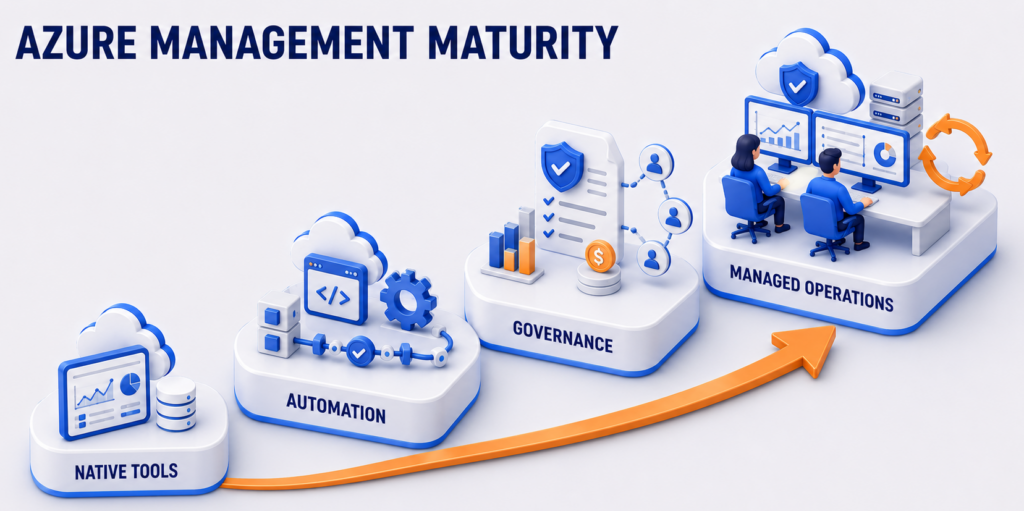
The best approach may change as the organization grows.
A small company may begin with Azure-native services managed by an internal team. As the environment expands, it may introduce infrastructure modules, centralized policy, a FinOps practice, enhanced security controls, and managed operational support.
Cloud management should evolve with the environment.
A process that worked during migration may no longer be sufficient when Azure supports critical applications across several business units.
How VIAcode Supports Azure Cloud Infrastructure Management
Organizations may not always have the internal capacity or specialized expertise to turn Azure data, alerts, and recommendations into consistent action. VIAcode helps close this gap through assessment, implementation, and ongoing management support. Working alongside internal teams, VIAcode helps address priority risks, improve operational consistency, and adapt cloud management practices as Azure environments grow and business needs change.
Cloud Infrastructure Management Evaluation Checklist
Use these questions when evaluating your current Azure management model.
Visibility
- Can we organize information by application, workload, subscription, and owner?
- Can teams distinguish urgent findings from routine recommendations?
- Can we see resource health, performance, cost, security, availability, and backup status?
Monitoring and incidents
- Do important alerts have owners?
- Are escalation paths documented?
- Are duplicate and low-value alerts removed?
- Are alert thresholds regularly reviewed?
- Are unresolved incidents reviewed?
Cost management
- Can costs be allocated to responsible teams?
- Are budgets and anomalies monitored?
- Can we identify idle, unattached, or oversized resources?
- Are optimization recommendations implemented and measured?
- Are commitments reviewed against expected usage?
Security and governance
- Are policies applied consistently across subscriptions?
- Are security recommendations prioritized?
- Does every critical finding have a remediation owner?
- Can we identify excessive or unused permissions?
- Are completed improvements verified?
Automation
- Are naming, tagging, and configuration standards automated?
- Can teams preview infrastructure changes?
- Are deployments defined through reusable infrastructure code?
- Are approved modules used across environments?
Resilience
- Are critical workloads documented?
- Are backup jobs and replication health monitored?
- Are recovery documents updated when infrastructure changes?
- Are failover and failback procedures tested?
- Have RTOs and RPOs been agreed with business owners?
Accountability
- Is responsibility clearly divided between Microsoft, internal teams, and service providers?
- Do leaders receive regular reports on risks, incidents, costs, and completed improvements?
- Can the internal team provide the required operational coverage?
Several “no” answers do not necessarily mean the organization needs a new platform.
They may indicate that existing Azure services need better configuration, integration, ownership, implementation support, or ongoing management.
Frequently Asked Questions
What is the best cloud infrastructure management solution?
The best solution depends on the cloud platform, environment size, internal expertise, security requirements, recovery objectives, and operational priorities.
For an Azure-focused organization, an effective model normally combines Microsoft’s native management services with automation, incident processes, cost accountability, security governance, and recovery planning.
What tools are used to manage Azure infrastructure?
Common Microsoft services include Azure Resource Manager, Azure Bicep, Azure Monitor, Azure Advisor, Azure Policy, Microsoft Cost Management, Microsoft Defender for Cloud, Microsoft Sentinel, Azure Backup, and Azure Site Recovery.
Each service addresses a different part of cloud infrastructure management.
Can Azure-native services manage an entire Azure environment?
Azure-native services provide extensive capabilities for infrastructure deployment, monitoring, cost management, governance, security, backup, and recovery.
Whether they are sufficient depends on the organization’s ability to configure and operate them consistently. Teams still need to review findings, respond to incidents, implement changes, test recovery, and measure results.
What is the difference between cloud management tools and managed cloud services?
Cloud management tools collect data, enforce policies, automate tasks, and generate recommendations.
Managed cloud services add people and operational processes. A provider may review alerts, triage incidents, implement recommendations, tune monitoring, conduct assessments, test recovery, and maintain governance.
How do cloud infrastructure management solutions reduce costs?
They help organizations allocate spending, monitor budgets, detect anomalies, identify idle resources, right-size workloads, optimize storage, evaluate commitments, and prevent uncontrolled resource growth.
The savings appear only after appropriate recommendations are implemented and validated.
When should a company use a managed Azure services provider?
Managed services may be appropriate when the organization lacks specialist Azure expertise, cannot provide sufficient monitoring coverage, struggles with recurring incidents, has excessive alert noise, cannot implement optimization recommendations, or needs stronger security and recovery processes.
What is cloud infrastructure entitlement management?
Cloud infrastructure entitlement management, or CIEM, helps organizations understand which users, applications, service principals, groups, and managed identities can access cloud resources.
It can identify excessive, unused, or misconfigured permissions and support least-privilege access.
Is a disaster recovery plan enough if Azure Site Recovery is enabled?
No. Azure Site Recovery provides replication, failover, and failback capabilities, but the organization must still define recovery objectives, understand application dependencies, document the recovery sequence, assign responsibilities, and test the complete process.
Conclusion
There is no single tool that covers every aspect of cloud infrastructure management. Most organizations require a combination of Azure-native management services, infrastructure automation, monitoring and observability, FinOps and cost controls, security and access governance, backup and disaster recovery, and well-defined operational processes. Clear ownership and specialist expertise are also essential to ensure these capabilities work together effectively.
Azure provides a strong technical foundation, but technology alone is not enough. The more important question is whether an organization has the time, skills, processes, and accountability needed to turn Azure data, alerts, and recommendations into consistent action.
A practical starting point is to assess which capabilities are already working well and where gaps remain. This includes identifying unresolved recommendations, risks without a clear owner, activities that would benefit from further automation, and operational responsibilities that cannot be managed effectively by internal teams.
VIAcode helps Azure-focused organizations close these gaps through monitoring and management, cost assessment and optimization implementation, security assessment and remediation, backup and disaster recovery, and ongoing Azure Assist services. This support enables organizations to move beyond simply receiving recommendations and begin converting them into measurable operational improvements.
Relevant service pages:
- Azure Monitoring and Management
- Azure Cost Optimization Assessment
- Azure Cost Optimization Implementation
- Azure Security Assessment
- Security Improvement Implementation
- Azure Backup and Disaster Recovery
- Azure Assist
Not sure where the gaps are?
Not sure whether your Azure environment needs better tools, stronger processes, or additional operational support?
VIAcode can assess the current environment and identify practical opportunities to improve cost management, security, visibility, governance, resilience, and operational reliability.